Background
Coding represents the largest use case for generative AI by both usage and dollars spent [1] [2], with developers increasingly relying on AI-powered tools to accelerate their workflows [3]. However, existing coding benchmarks have predominantly focused on evaluating models’ ability to solve isolated programming problems—individual functions, algorithms, or bug fixes [4] [5]. While these benchmarks provide valuable insights into code generation capabilities, they fail to capture the frontier of AI-driven software development.
The most impactful application of AI coding assistants is building complete applications from natural language specifications, a zero-to-one use case that can accelerate development and enable non-technical prototyping. However, no standardized framework exists for evaluating this end-to-end capability. Our benchmark addresses this gap by testing models’ ability to build functional applications in a full development environment, evaluating results through point-and-click testing to measure whether models can deliver working software that meets user requirements.
We will be rolling out an access plan for this benchmark in the coming weeks - if you’re interested, please fill out this form.
Results
Even top performers fall short: no model consistently delivers applications that pass every test, highlighting that reliable end-to-end application development remains an open challenge. In the current canonical v1.1.1 test-set results, Claude Fable 5.2 (OpenHands) leads at 83.52%, followed by Claude Sonnet 5.5 (OpenHands), Gemini 4 Neon (OpenHands), GPT-6.2 Sol (OpenHands), Claude Fable 5.1 (OpenHands), and GPT-6.2 Astra (OpenHands).
Application Examples
We asked all models to implement “Zeeter” - a website where users can write short-form messages, which appear to their followers. Features included:
- Authentication (sign up and log-in)
- Creating “Zeets”
- Viewing the Zeets of their followers
- Liking and Commenting on Zeets
- Removing Zeets
- Following and unfollowing other users
- Searching
- An explore page to discover users
Read the full specification and the evaluation rubric.
Here are currently hosted applications for Zeeter:
- Anthropic Claude Opus 5.5 (high)
- Google Gemini 4 Argon
- OpenAI GPT-6.1 Sol
- DeepSeek V4.1 Flash 1017
- Kimi K3
- Thinking Machines Inkling 2 Small
These applications were created entirely by the LLM, and only the networking configuration (host, port) was modified. Please do not put any sensitive personal data into these apps, or re-use any password. We make no guarantees of security, functionality, or content moderation.
Evaluation Examples
Here is an example of how the models were automatically evaluated. Each test has multiple steps. You can see the steps that the evaluator agent goes through for a selection of the models, and what the application looks like at each step.
Tool Calling
We provided over thirty tools to the models, including operations to manage Supabase state, browse their running applications, and perform web searches. However, most of these tools were rarely used. The majority of tool use was concentrated in the four tools shown in the chart above.
Every model used the file editing and bash command tools extensively. The browser and SQL execution were the next most used, though usage varied significantly across models. Models typically used the browser to test their applications after implementation.
Trajectory Analysis
We have taken the trajectory rollouts for each model while working on the Zeeter application, and categorized each step the model took into one of several buckets. You can see there is large variation in how models choose to spend their time, as well as variation in the length of each trajectory.
Error Analysis
Here, we report the most common qualitative error modes we saw when manually inspecting the trajectories.
-
Installation Issues: Although the environment came with Docker and Node pre-installed, we expected the models to be able to install other tools and libraries (e.g., Tailwind) they needed via bash commands. Most models did not get these commands right on their first try. The best models were generally able to get it on the second or third try, while the worst wasted a significant amount of time and turns on unsuccessful installation attempts.
-
Configuring Docker Networking: A crucial part of any app that requires communication with Supabase or a backend is ensuring the frontend knows the backend/Supabase endpoint. The best models determined that to make the environment variables available, they needed to either add a .env file in the “frontend” directory or pass the URL via build.args in the Docker Compose config. Passing it via the env_file parameter does not work, since that only controls runtime environment variables. The less performant models, however, would often get stuck on this for many turns or never solve it.
-
Timeout Issues: A common error mode, especially for the worst models, was to continue making changes to files right up until the time or turn limit. This led them to not end the session with a working app.
-
Giving Up Early: Often, models still had plenty of turns left, but they would use the finish tool to submit their work (the prompt was extremely explicit that this ends their ability to make further changes). The best models kept working on the problems until they had solved them, and had also tested that their solution was working.
-
Direction Following: The less-performant models would often forget key aspects of the initial prompt, leading to major errors
Part of our goal was to measure whether models used the resources (time and turns) efficiently. We found the best models were able to do this, debugging issues in their code or config much quicker than worse models. This efficiency meant they were able to make it much further in a task.
Methodology
Specification and Test Construction
Our benchmark consists of application specifications and corresponding test suites that were carefully constructed through a multi-stage process combining AI generation with expert human review. We generated an initial corpus of ideas using language models, drawing inspiration from real-world consulting case studies, freelance development tasks and startup application patterns. Each specification describes a complete web application in non-technical, natural language, constrained to under one page to ensure clarity and focus on MVP functionality.
Every specification underwent multiple rounds of review by professional product managers and software engineers. Reviewers validated that each specification was clear, executable, and representative of real development work. They ensured specifications avoided prescribing specific technology stacks, allowing models the flexibility to choose appropriate frameworks and tools.
Each specification was paired with 20-60 automated tests covering core functionality, edge cases, and critical user workflows. Each test was triple-verified by professional software engineers to ensure it accurately validates the intended functionality, passes when the feature is correctly implemented, and fails when the feature is broken or missing.
Development Environment and Available Tools
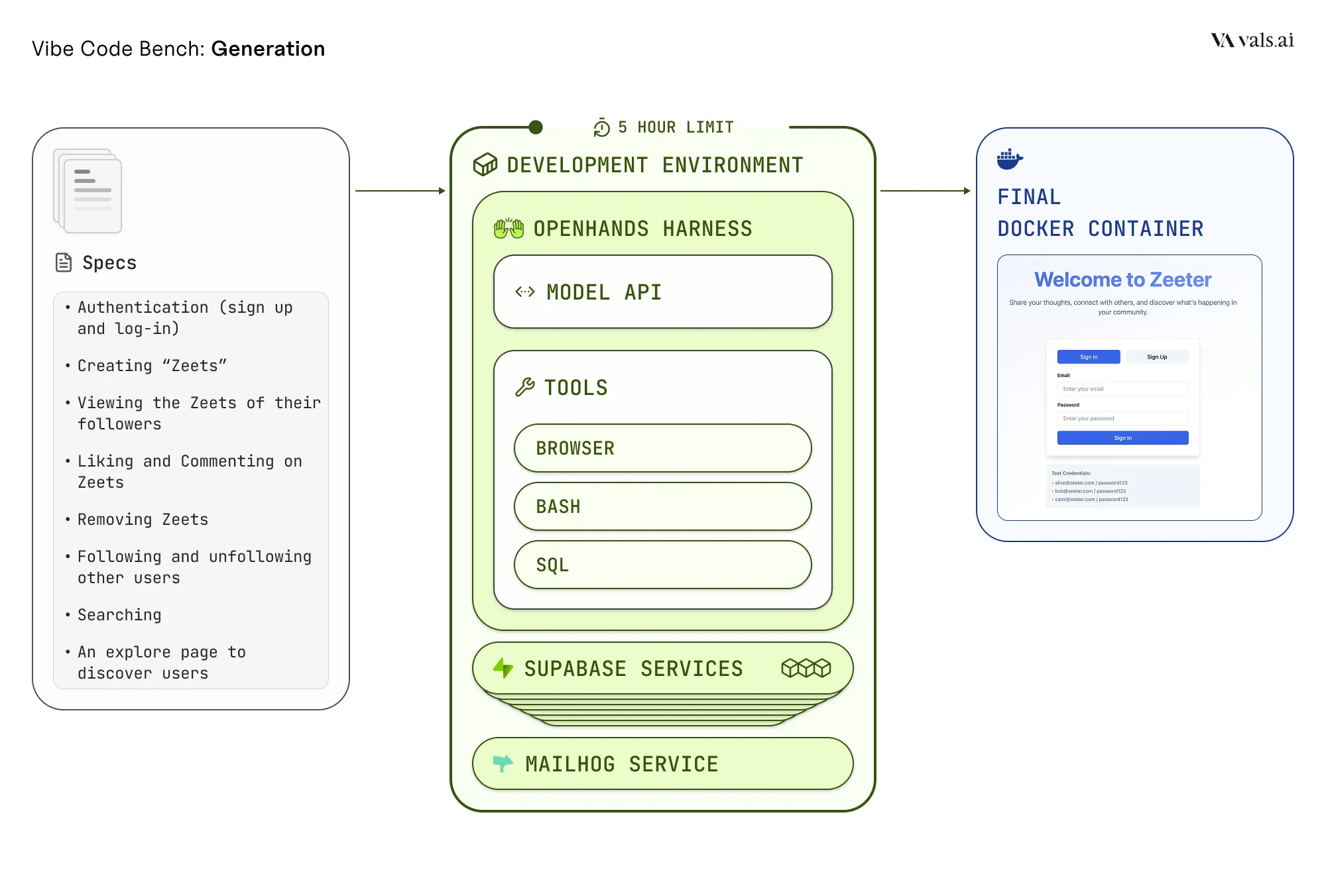
Models operate within a fully-featured development environment built on a modified version of OpenHands, an agentic coding harness and framework. The environment uses a Docker-in-Docker architecture, providing each model with an isolated container where it has complete control over the development workspace. Models have unrestricted access to terminal commands, allowing them to install dependencies, run build processes, start servers, and execute any command-line operations necessary for application development.
To enable realistic application development, we provide models with access to a streamlined set of production-grade services running in sandbox or test modes. For authentication, database operations, and file storage, we use self-hosted Supabase instances; for payments, Stripe in test mode; and for email functionality, MailHog. Models also have access to web browsing capabilities for documentation lookup and external service integration. All API keys and service endpoints are pre-configured in the environment, allowing models to integrate these services without manual setup.
Models can work for up to 5 hours or 1000 turns on each application, with access to web browsing capabilities for documentation lookup, file system read/write operations, and the ability to spawn multiple processes. This mirrors the environment a human developer would have when building an application from scratch, with the added benefit of sandbox services that eliminate external dependencies and ensure reproducibility.
Automated Testing and Scoring
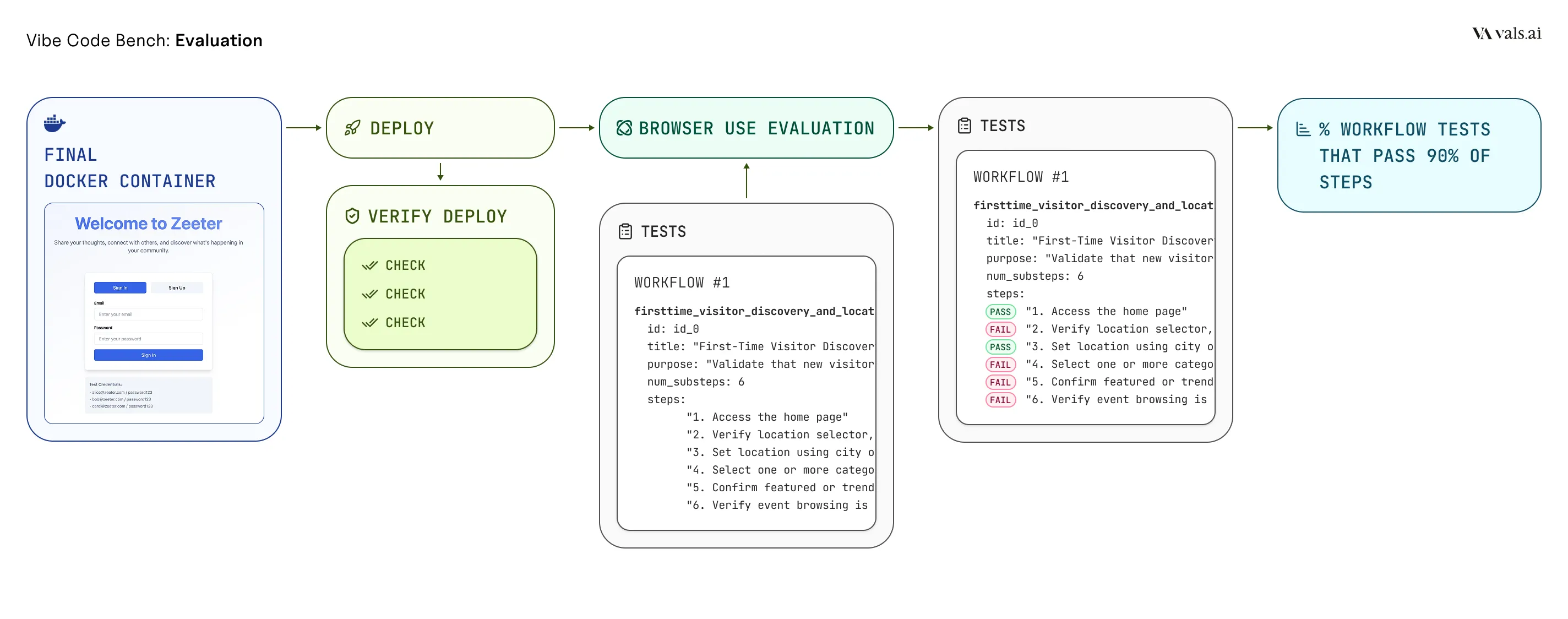
Our evaluation pipeline automatically tests each generated application through a workflow-style process designed to comprehensively assess functionality without human intervention. Once a model completes application development, we first verify the application builds and runs successfully. The application is then deployed to a local port within an isolated Docker container, where our automated testing infrastructure can interact with it.
UI tests are executed using Browser Use, an autonomous web agent that interprets natural language test instructions and performs point-and-click interactions with the running application. For each workflow, the agent navigates to the application, executes a sequence of user actions (such as signing up, creating records, or submitting forms), and validates that the expected outcomes occur at each step. The agent captures screenshots and DOM snapshots throughout testing, providing detailed execution traces for analysis. A second judge model reviews each failed check against this recorded evidence before the failure counts.
Each UI test is composed of a series of “substeps” (e.g. 1. Login to the application, 2. Navigate to the profile page, etc.). The score for an application is the percentage of tests in which every substep succeeds. This final overall score is the average of the application-specific scores.
To validate our automated evaluation, we conduct alignment studies where professional engineers manually test subsets of applications using the same criteria. Current public reporting focuses on completed internal consistency/calibration analyses, with larger external human-evaluation rounds tracked separately.
The entire pipeline—from application generation through testing and scoring—runs automatically without human intervention, allowing us to evaluate multiple models across hundreds of application specifications with consistent, reproducible results. Evaluation costs about 2 dollars per app generated.
Vibe Code Bench v1.1.1
Vibe Code Bench v1.1.1 was released on November 20, 2026. This update changes how applications are graded. It does not change the tasks or the specifications the models build from.
Evaluation
- We upgraded the browser-testing agent to a newer, faster model and a newer version of Browser Use.
- A second judge model now reviews each failed check against the recorded evidence (screenshots, page state and agent actions). A failure counts only if the evidence supports it. This removes failures caused by the testing agent itself rather than by the application.
- An application now passes a test only when every substep succeeds. Before, 90% of substeps was enough. This matches the scoring in Vibe Code Bench 1-100 and makes a pass mean the feature fully works.
- These changes reduce evaluation cost by roughly 85-90%.
Data
- We reviewed the UI tests and fixed or removed steps that were impossible to complete or open to more than one reading. Each remaining check follows from the specification.
Results
We re-graded the applications that each model built in its Vibe Code Bench v1.1 run with the new grader. The models did not rebuild the applications, so score changes come from grading alone. Scores are lower across the board because the pass bar is now 100% of substeps.
Vibe Code Bench v1.1
Vibe Code Bench v1.1 was released on February 24, 2026. This update includes improvements to the benchmark’s data, evaluation pipeline, and overall reliability as compared to v1.0.
Data
- We standardized the authentication of the specifications, providing clearer instructions to the agent on what the auth model should look like
- We made explicit the email that the evaluator model should use when doing each ui test, to avoid the low chance of collisions.
- For certain features being tested in the UI tests, we added more clarity to the corresponding instructions in the spec.
- We improved the instructions in the tests on the dummy payment information for Stripe
Evaluation
- We added some new tools to the browser-use evaluator model, meaning it can better handle HTML elements like date pickers
- We improved the evaluator’s ability to “wait” for certain actions to occur
- We added some additional files (csv, .jpg, .png, .pdf etc.) that the evaluator can use in the course of its evaluation.
All models were re-run from scratch using the Vibe Code Bench v1.1 harness and data.
Acknowledgements
A special thanks to Alex Gu, whose input was instrumental for the creation of this benchmark. We also appreciate Mike Merrill and John Yang for sharing their lessons learned with Terminal-Bench and SWE-bench Verified. Finally, we want to shout out Engel Nyst, Graham Neubig, and the rest of the OpenHands team for their work.
Citation (BibTeX)
@inproceedings{tran2026vibecodebench,
title        = {Vibe Code Bench: Evaluating AI Models on End-to-End Web Application Development},
author       = {Hung Tran and Langston Nashold and Rayan Krishnan and Antoine Bigeard and Alex Gu},
booktitle    = {ACM Conference on AI and Agentic Systems (ACM CAIS '26)},
year         = {2026},
doi          = {10.1145/3786335.3813180},
url          = {https://arxiv.org/abs/2603.04601},
}